Installation
Get your SaaS boilerplate up and running in minutes with our streamlined installation process.
Prerequisites
Before you begin, make sure you have the following installed and configured on your system:
- pnpm - Fast, disk space efficient package manager
# Check if pnpm is installed
pnpm --version
# If not installed, run:
npm install -g pnpmQuick Setup
Choose your setup style:
Cursor Setup (Recommended) – Fastest way, AI handles everything.
Manual Setup – Full control, step-by-step configuration.
Option 1: Cursor Setup (Recommended)
1. Clone the Repository
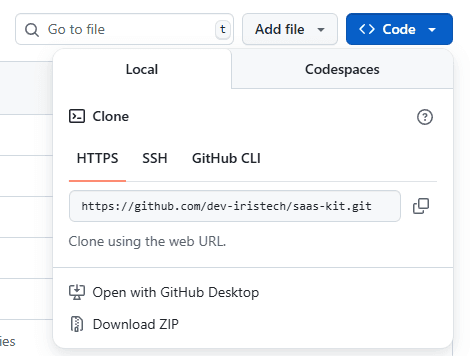
Clone the repository and navigate to your project:
git clone https://github.com/dev-iristech/saas-kit.git
cd saas-kit
cursor .
OR
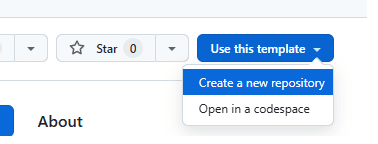
Create a new repository in your own account
2. Initialize with Cursor Agent
Open Cursor and open cursor agent (Ctrl+L / Cmd+L) and run:
@saaskit-initThis command will:
- Install all dependencies
- Set up your Convex backend
- Configure authentication providers
- Create .env.local
- Initialize your development environment
Option 2: Manual Setup
1. Clone the repository (refer to step No. 1 in Option 1)
2. Install Dependencies
# Install dependencies
pnpm install
3. Configure Environment Variables
# Create .env.local file in the root folder (This file is not pushed to the repo and should not be public)
#File name is
.env.local
4. Initialize Convex Backend
npx convex dev5. Start Development Server
pnpm devVerification
Once setup is complete, you should have:
- ✅ Development server running on
http://localhost:3000 - ✅ Convex dashboard accessible for backend management
- ✅ Environment variables configured for authentication
- ✅ Database schema deployed and ready
Next Steps
After installation, choose your development approach:
🎨 Vibe Mode - Let AI build your SaaS quickly 🔧 Manual Mode - Step-by-step customization guides
Or dive into specific areas:
- Build Product Context - Plan your SaaS concept
- Setup Landing/Waitlist Page - Build your audience
- Setting up Payment - Configure billing
- All How-To Guides - Browse all customization options
Troubleshooting
Common Issues
Port Already in Use:
# Kill processes on port 3000
lsof -ti:3000 | xargs kill -9
Convex Connection Issues:
# Reset Convex configuration
npx convex dev --reset
Package Manager Issues:
# Clear package manager cache
pnpm store prune
pnpm install --force
Getting Help
- Check the Technical Documentation for detailed guides
- Review Environment Variables setup
- Visit the Convex Documentation for backend issues